Table of Contents
- Evolution of Bottom Sheets
- Types of Bottom Sheets
- Best Practices for Implementation
- Accessibility Considerations
- Real-World Examples
- Conclusion
Bottom sheets have become a staple in mobile user interface (UI) design, offering modern ways to present supplementary content with minimal disruption to the user’s experience. As developers and designers strive for greater fluidity and efficiency, the use of bottom sheet UI design has risen sharply across major app ecosystems. Bottom sheets not only improve visual flow but also enable applications to unveil new actions or contextually relevant information while keeping users anchored to their current task.
This trend evolved in response to the limitations of modal pop-ups and full-screen overlays, which have traditionally diverted attention from the underlying content. Instead, bottom sheets introduce supplementary actions, details, and navigation in an ergonomic and context-sensitive manner. For users, this means better accessibility, less friction, and a smoother overall experience. For designers and product teams, bottom sheets offer a dynamic, space-efficient way to enhance functionality and user satisfaction. Across both Android and iOS, bottom sheets have cemented their place as indispensable UI elements in apps ranging from maps to streaming services to messaging tools. They are admired for their discreet presentation and for engaging users without requiring them to leave their current screen. As the industry continues to evolve, mastering the correct application of bottom sheets has become essential for delivering competitive mobile products and creating delightful user experiences.
Evolution of Bottom Sheets
Traditional approaches to displaying additional content within mobile apps leaned heavily on modal dialogs and overlays. While these methods could deliver information or prompt an action, they often did so by interrupting a user’s flow and obscuring the main content. The need for a less disruptive alternative led to the innovation of bottom sheets, which originated as a solution for quick actions and context-sensitive content. Unlike earlier overlays, bottom sheets maintain visibility of the underlying screen while offering users a secondary layer for options and information. This approach grants users better control over their navigation and enables multitasking without cognitive overload. As a result, bottom sheets have steadily replaced modals in many design systems, providing a bridge between transient pop-ups and permanent in-app features.
Types of Bottom Sheets
Persistent Bottom Sheets
Persistent bottom sheets remain anchored at the bottom edge of the application window. They provide continuous access to information or controls, such as audio media menus or navigation panels. Because they remain visible as users interact with other parts of the screen, persistent sheets are ideal for features that require frequent access. Navigation bars or playback controls in media apps are common examples of this style.
Modal Bottom Sheets
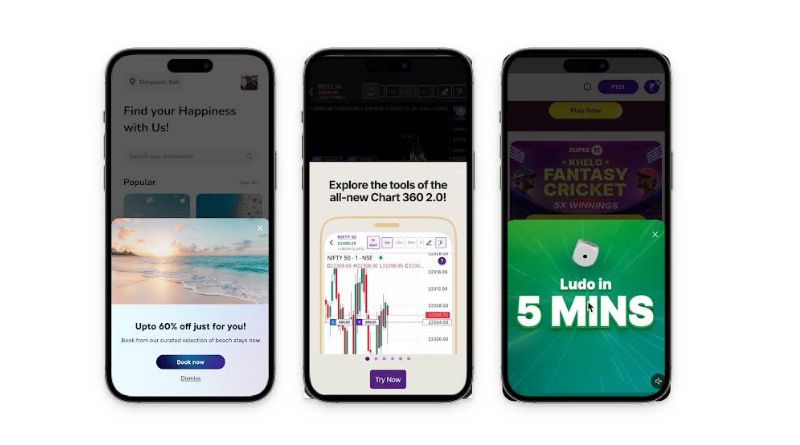
Modal bottom sheets provide a temporary overlay for tasks that require user focus, such as editing information or selecting actions. Unlike persistent sheets, they sit above the main content until dismissed. Users typically trigger them by tapping buttons or navigating to specific sections, after which the sheets can be dismissed either by direct action or swiping away. They are frequently used for tasks like sharing, sorting, or viewing expanded details.
Best Practices for Implementation
- Use Appropriate Detents: Define clear, intuitive heights where your bottom sheet can snap, such as a minimal “peek,” an intermediate half-expanded state, and a fully expanded state. This approach gives users visual cues about interactivity and lets them decide how much information they want to engage with at a glance.
- Ensure Smooth Dismissal: Allow users to easily close the sheet using natural gestures, such as swiping down or tapping outside the sheet. Avoid forcing users to search for dismissal options, which can cause frustration.
- Manage Scroll Behavior: If the content inside your sheet is scrollable, make sure interactions are clear. This means distinguishing between scrolling within sheet content and moving the entire sheet, so users do not get trapped in confusing interactions.
- Limit Overuse: Use bottom sheets purposefully. Overuse can overwhelm users and undermine their value. Stick to situations where supplementary or contextual actions are needed.
Accessibility Considerations
- Screen Reader Compatibility: Make sure screen readers properly announce bottom sheets. Set clear labels, roles, and descriptions so users with visual impairments understand the context and how to interact with the sheet.
- Keyboard Navigation: Users who rely on keyboards or assistive devices must be able to move between focusable elements inside the sheet and should not be trapped or lose access to other parts of the interface.
- Visual Indicators: Present clear, recognizable cues for common actions, such as close buttons or drag handles. These indicators help users with limited dexterity or cognitive challenges understand available options.
Real-World Examples
- Google Maps: Implements bottom sheets for location details, user reviews, and directions. The use of sheets ensures users can reference map content while engaging with context-specific info, eliminating repetitive back-and-forth navigation.
- Spotify: Integrates bottom sheets for media controls and quick actions. Users can browse playlists or discover new music while actively controlling playback from an always-available sheet.
- Instagram: Utilizes modal bottom sheets for sharing, reporting, or managing post settings. Sheets appear over current content, allowing users to complete tasks and return to their feed quickly.
Conclusion
Bottom sheets have transformed mobile UI design, offering an ergonomic, contextually relevant approach to delivering additional content and functionality without disorienting users. By understanding the history, types, and best practices for implementing bottom sheets, designers and developers can harness their full potential to enhance product engagement and deliver seamless, accessible interactions for everyone.